Reward participants anonymously.
No email, ever.
Most "anonymous" reward setups still collect an email address somewhere to deliver the reward — which makes the data pseudonymous, not anonymous, under GDPR. On-screen delivery never asks for one: the reward code appears right after the survey ends, with nothing for an IRB or ethics board to flag as identifying data. Choose this per survey, or combine with email delivery for others.
Choose how you reward participants
| By email | Without email |
|---|---|
| Reward is sent by email | Reward appears instantly |
| Requires an email address | No email address needed |
| Good when you need an email trail | Good when you'd rather not collect email |
You can use both methods. Choose per survey.
Why this matters for GDPR — and your ethics board
Under GDPR, data that could still be traced back to someone — even just an email address, kept separately — is pseudonymous, not anonymous, and stays subject to the full regulation. Most "anonymous reward" setups, including a second linked survey that only collects an email, still clear that low bar. On-screen delivery doesn't: nothing identifying is ever asked for, so there's nothing for an IRB, METC, or ethics committee to review as a data-protection risk in the reward step itself. If your protocol promises participants genuine anonymity, this is the one delivery mode where that promise doesn't quietly depend on an email address living somewhere in a spreadsheet.
No email. No waiting. Instant reward.
Participants receive their reward the moment they finish the survey. No email address, no inbox, and no manual work.
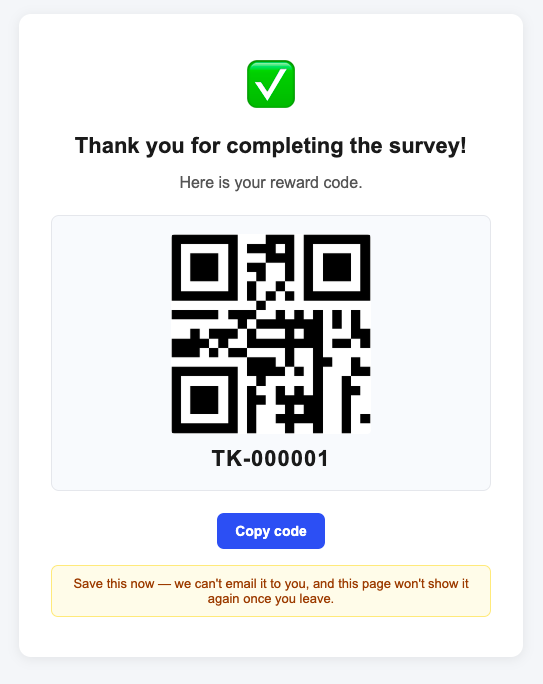
Thank you for completing the survey!
Here is your gift card.
Left: an actual screenshot of the delivery card. Right: the exact same card, rendered with the QR image switched off — a per-account setting, so a plain code works just as well for a voucher or gift card as a scannable one does for anything scanned.
From survey to reward in one step
You supply the gift cards or codes; REWARDR handles the automatic delivery.
Works with your survey platform
LimeSurvey · Qualtrics · REDCap · Castor EDC · Tally · JotForm
No batch of pre-generated unique links to manage or distribute like some other tools require — you set one fixed URL, and it keeps working automatically for every future response.
SurveyMonkey and Typeform can't pass a value generated at the end of the survey into their own redirect link — use Email delivery mode for these two platforms instead.
One account. Two ways to reward.
On-screen — instantly after completion. By email — when email is wanted or required. You choose the method per survey.