

Stop matching rewards by hand
Keep your existing survey. Keep your existing rewards. Just automate the last step.
Without REWARDR
- Export the participant list
- Find their email
- Find an unused reward code
- Match the code to the participant
- Send the email by hand
- Update a spreadsheet
- Repeat for every participant
With REWARDR
- Survey completed
- Reward sent
- Everything recorded automatically
Import the rewards you already have
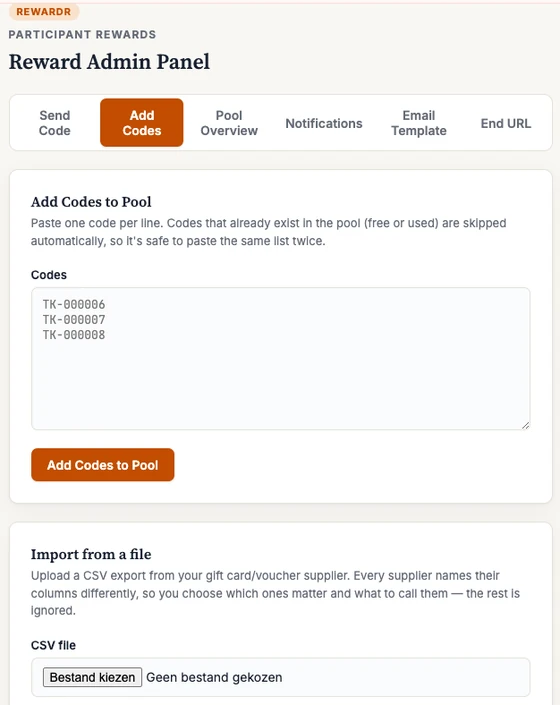
Every gift card or voucher supplier exports a different file. REWARDR doesn't force a fixed format on you.
No fixed column names required
Upload the export your supplier gives you — however its columns are labeled ("Card Number", "GC Number", "Voucher Code," anything) — and choose which ones should reach the participant.
Card number and PIN? Both, one email.
Combine several columns into one labeled reward — "Card number: X, PIN: Y" — exactly as your supplier issued it, no reformatting by hand.
Whichever way your LimeSurvey collects email — it adapts
LimeSurvey itself has no built-in question type for collecting reward contact details separately from survey answers — most guides suggest redirecting to a second survey just to ask for an email. REWARDR skips that workaround entirely.
Email comes from LimeSurvey's own token table
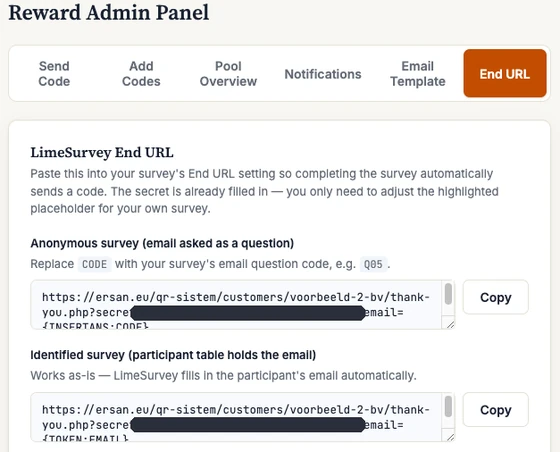
If your survey uses LimeSurvey's participant/token system, {TOKEN:EMAIL} supplies the address directly in the End URL — nobody's asked for it again.
Email comes from their own answer
If the survey itself is anonymous, an optional question in LimeSurvey simply asks for an email address to send the reward to — leaving it blank is treated as "no thanks," not an error.
An honest thank-you page, every time
Three distinct, plain-language outcomes — never a confusing technical error shown to a participant.
Reward sent
"Your code is on its way to your inbox." Shown once for a new code, and again (worded as a resend) if this participant already has one — never a second, different code.
No reward requested
The participant left the optional email question blank — they're still thanked warmly, with no mention of a code they never asked for.
Something needs a human
An invalid email, or a code that couldn't be generated — the participant is asked to get in touch, rather than being shown a raw error.
Only what's needed to send one email
The page LimeSurvey's End URL points to only ever does one thing with the email address it receives: assign a reward code and send it. It doesn't become part of your survey's response data, and the link itself can't be reused by anyone who didn't come from a real, completed LimeSurvey response.
- The End URL is signed with a shared secret — a guessed or copied link without it is rejected outright.
- A participant can never accidentally receive a duplicate reward — submitting twice just returns their same code again (technically: reassignment is idempotent).
- Declining to give an email (on an anonymous survey) is treated as a normal, valid outcome — not logged as an error.
- Nothing is stored beyond what's needed to avoid double-issuing a code — no participant list, no survey answers.
Not a LimeSurvey plug-in — it just reads your End URL
This never talks to LimeSurvey through an API or a plug-in — it only needs the End URL setting every LimeSurvey install already has, with the participant's email carried along via {TOKEN:EMAIL}. Running other tools alongside LimeSurvey? The same setup works for these too:
| Survey platform | Support | Where to set it |
|---|---|---|
| LimeSurvey | ✓ Native | Survey → End URL, with {yourquestioncode.NAOK} or {TOKEN:EMAIL} |
| Qualtrics | ✓ Native | Survey Flow → End of Survey → "Redirect to a URL", piping ${e://Field/email} |
| REDCap | ✓ Native | Survey settings → "Redirect to a URL" on completion, piping [email_field] |
| Castor EDC | ✓ Native | Invitation settings → Finished URL, piping {your_email_field} |
| SurveyMonkey | ✓ Native | Collector → Survey End Page redirect, with a custom variable |
| Typeform | ✓ Native | Redirect on completion, recalling a hidden field into the URL |
| Tally | ✓ Native | Form Settings → Redirect on Completion, inserting the Submission ID via the field picker |
| JotForm | ✓ Native | Thank You Page → redirect to external URL, piping {id} |
| Google Forms | ⚠ Workaround | No native auto-redirect — a clickable link in the confirmation message, or an Apps Script embed |
- Reads the participant's email straight out of the end URL's own query string — no separate integration to maintain.
- Runs as a small, self-contained script on your own server — nothing to install on the survey platform itself.
- The reward-code logic (how codes are generated, what triggers a resend) is written once and reused for every survey wave.
A small admin panel, for the moments automation isn't enough
Everything above runs on its own — this is for the handful of times a coordinator needs to look something up or fix something by hand.
Send a code by hand
If a participant's automatic trigger didn't fire for some reason, look up their email and send their code manually — same "never a duplicate" logic applies, so it's always safe to try.
Paste in a new batch of codes
Adding another batch of reward codes is one paste, one click. Anything already in the pool — free or already used — is skipped automatically, so re-pasting a list by accident never causes duplicates.
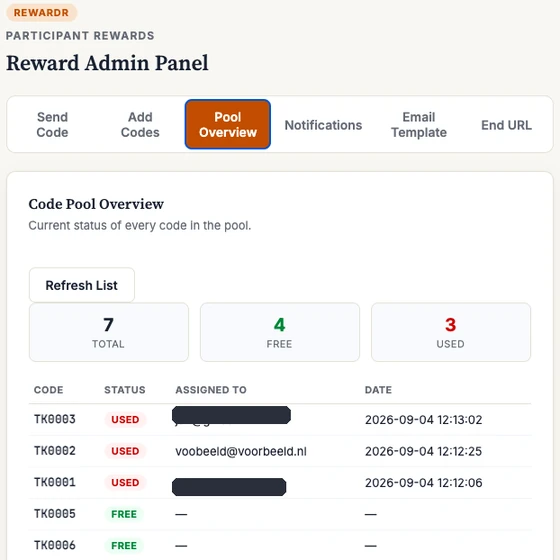
See exactly what's left
A running count of free vs. used codes, and a full table of every code, who it went to, and when — so "are we about to run out?" is always a glance away, not a spreadsheet search.
Get warned before the pool runs dry
Whoever's managing the study can add or remove their own email from a short notification list — they hear about every code sent out, and get an early warning once the pool is running low.
LimeSurvey reward delivery — questions we get
Does REWARDR require a LimeSurvey plugin?
No. It only needs the End URL / redirect setting every LimeSurvey install already has under Survey Settings. There's no plugin to install and no API integration to build — you paste one signed link, and LimeSurvey's own redirect does the rest.
How do you stop the same LimeSurvey response from claiming two rewards?
Two layers. Piping {SAVEDID} — LimeSurvey's own reference for that exact response — into the End URL means a captured link can't be replayed with a different email to mint extra codes. On top of that, the same email address is only ever assigned one code, so even a genuine double submission (a reload, a double click) just returns the existing code instead of a new one.
Does this work with an anonymous LimeSurvey?
Yes. Add an optional question asking for an email address just for the reward, and pipe {CODE.NAOK} — your question's own code — into the End URL. Leaving it blank is treated as "no reward wanted," not an error, and the rest of the survey's anonymity is untouched.
Can I skip collecting an email entirely?
Yes — On-screen delivery mode shows the code directly on the thank-you page the instant the survey ends, using {SAVEDID} as the reference instead of an email address. No participant email ever reaches REWARDR in that mode.
What does REWARDR cost for a LimeSurvey study?
Priced per participant — from €0.75 to €1.50 depending on volume, with no minimum and no separate plans to pick between. Use the calculator above for your exact price.
Tell us about your survey
If completing your LimeSurvey should unlock a reward — a test kit, a voucher, anything redeemable by code — this is built to handle exactly that, automatically. A few details and we'll get back to you.