Ertan Ersan
Research data manager · Amsterdam

Ertan ErsanI turn messy research data into clear, usable tools.

Data manager by profession and builder of research software. For more than 25 years I have been writing databases, scripts and applications that make data easier to find, trust and reuse — from MS Access and VBA to Python, R, PHP, SQL and AI.

This is a personal page: it introduces me and the work I have done. Nothing on this page is for sale.

17products & tools built and launched
8survey platforms REWARDR connects to
4export formats in METACO: DDI, Frictionless, Stata, CSV
25+years of building data applications
What I do

From raw data to a reliable, documented dataset

Most of my work happens between the raw data and the analysis.

🗃️

Data management

Collecting study datasets, validating and cleaning them, designing database structures and keeping data secure and private.

📚

Metadata & documentation

Documenting every table and variable so that analyses can be replicated and nothing has to be guessed.

🛠️

Study tools

Building the tools a study needs — questionnaires, data pipelines, dashboards and applications in Python, MS Access VBA, PHP, R and SQL.

Projects

Software I designed and built

A selection of the software I have built over the years. Each one started from a real problem I saw in day-to-day work.

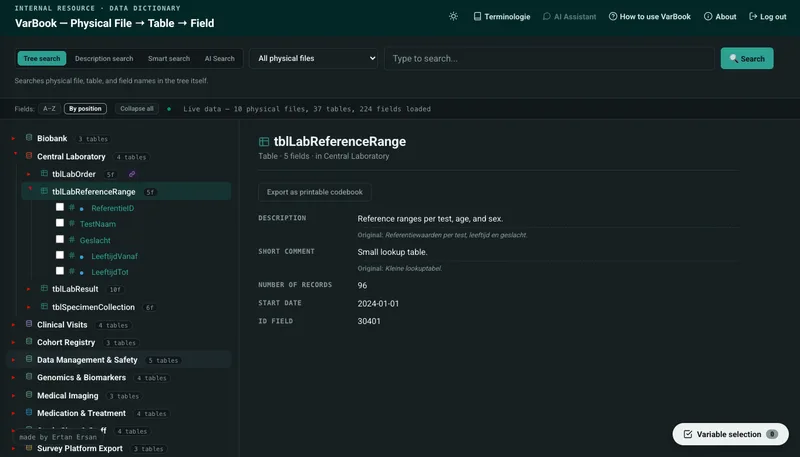
METACO — A live data dictionary for research studies
METACO

A live data dictionary for research studies

Every study ends up with half-updated codebooks and variable lists scattered over spreadsheets. METACO brings them together in one browsable, searchable, bilingual data dictionary.

PHPSQLiteJavaScriptClaude APIDDI
About this project →
  • Browse every file, table and variable in one tree
  • Search by meaning — finds fields even when the wording differs
  • Dutch and English descriptions side by side
  • Sensitive fields flagged automatically
  • Full change history with one-click restore
  • Export to DDI-Codebook 2.5, Frictionless Data, Stata and CSV
  • Optional AI assistant that answers from the dictionary itself
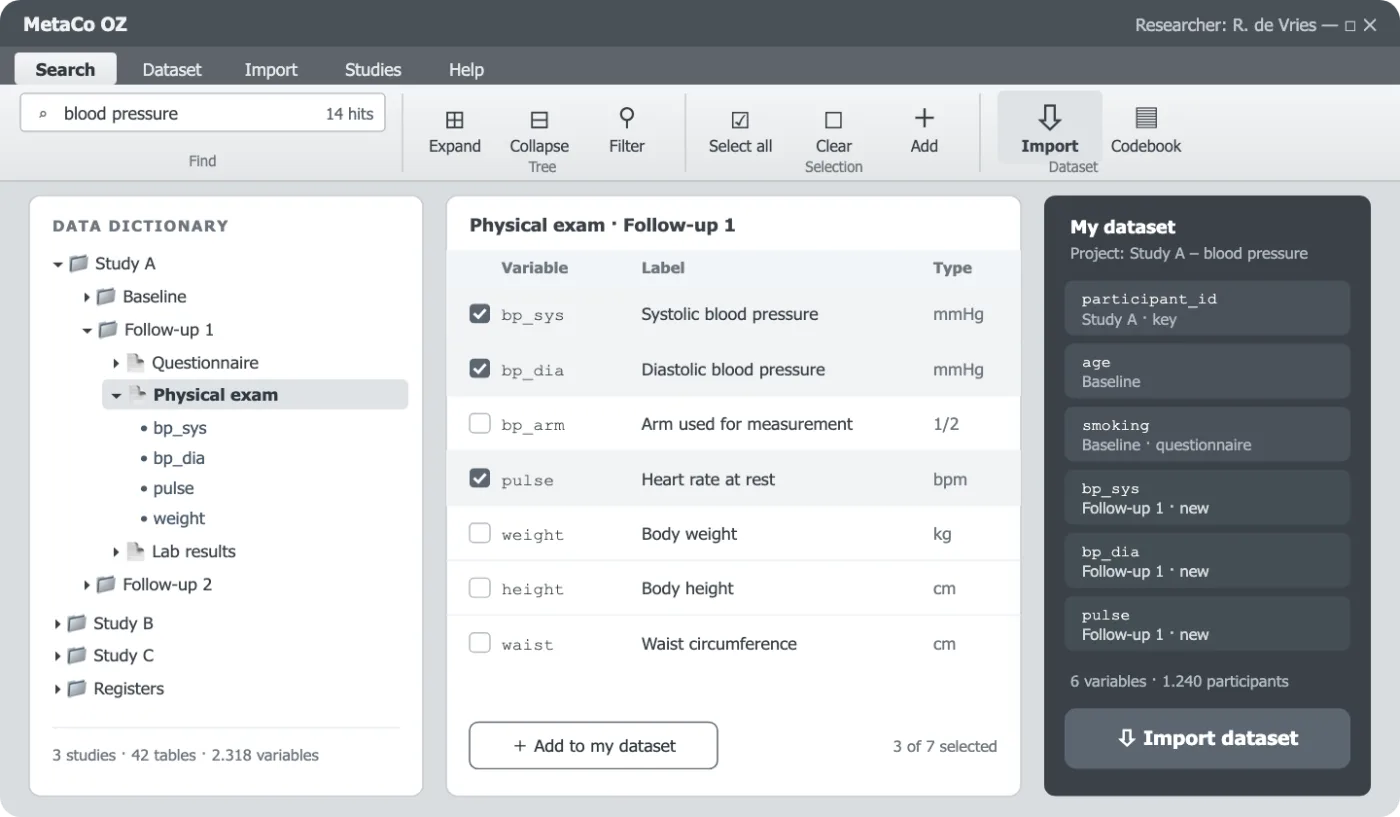
MetaCo OZ — Researchers build their own dataset from the data dictionary
MetaCo OZ

Researchers build their own dataset from the data dictionary

An internal MS Access application with a tree view (OZ: onderzoekers, researchers). Researchers find variables in the data dictionary and import the ones they select, so they can build their own dataset.

MS AccessVBA
  • Tree view of the data dictionary
  • Find variables and import the selected ones
REWARDR — Automatic rewards for survey participants
REWARDR

Automatic rewards for survey participants

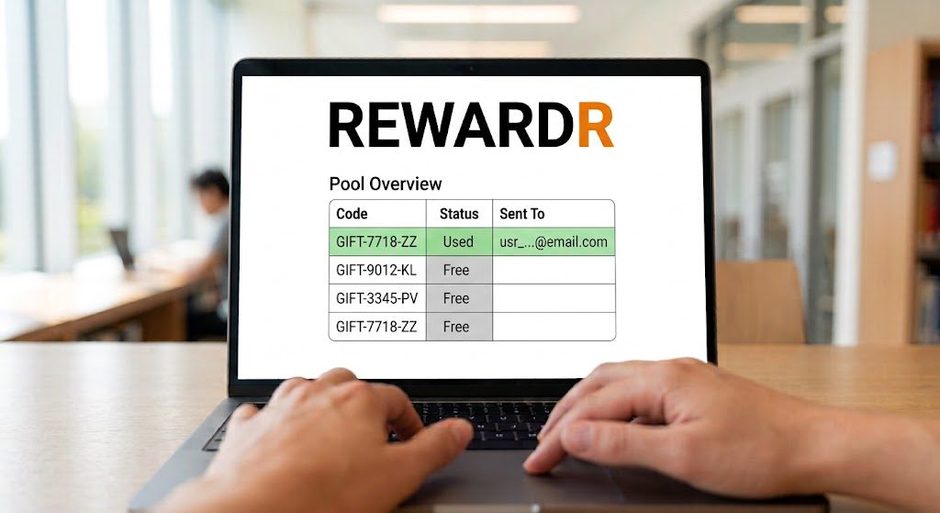
Matching survey participants to gift-card codes by hand is slow and error-prone. REWARDR automates it: one link on the survey's end page, and each participant receives a reward the moment they finish.

PHPSQLSurvey platformsGDPR
About this project →
  • Works with LimeSurvey, Qualtrics, REDCap, Castor EDC, SurveyMonkey, Typeform, Tally and JotForm
  • Set up with a single End URL — no plugin, no API key
  • Never hands out the same reward twice
  • Works with any gift cards, vouchers or QR codes
  • Can run without collecting a participant's email at all
Vragenlijstkaart — An interactive map of how survey questions are connected
Vragenlijstkaart

An interactive map of how survey questions are connected

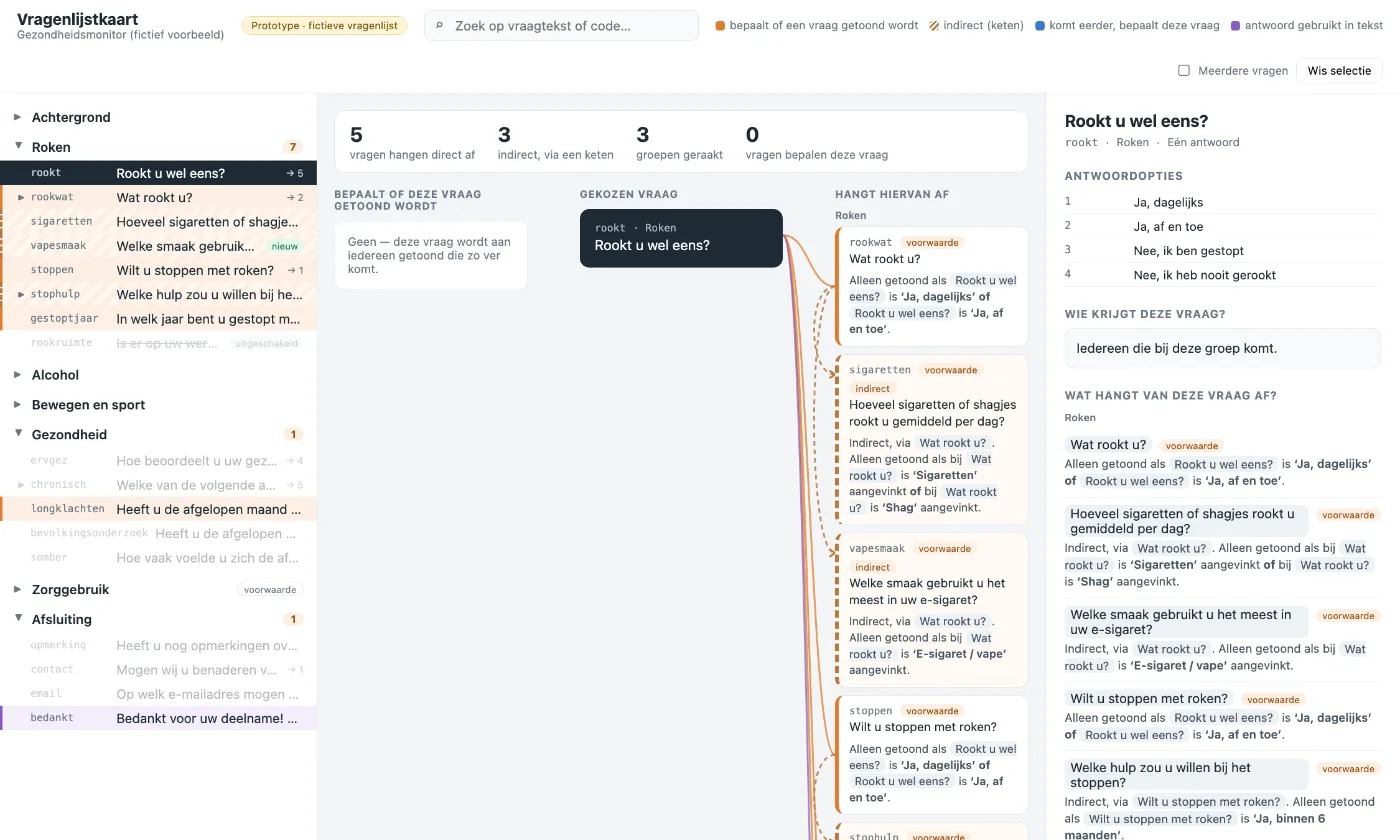
Long-running surveys change a little every round. Before a question is changed, added or dropped, you need to know what else it affects – but in LimeSurvey that logic is hidden in conditions and codes. Vragenlijstkaart (Dutch for 'survey map') turns a LimeSurvey survey file (.lss) into an interactive map, so the connections can be seen and discussed before anything is built.

HTMLJavaScriptLimeSurvey
  • Click a question: see what decides it and what depends on it, across groups and chains
  • Works down to single answer options
  • Conditions in plain language instead of code
  • Select several questions to see the combined effect of a change
  • Runs in the browser from one file: no server, no participant data
  • Working prototype, shown here with a fictional survey
Appco — Appointment and follow-up system for study participants
Appco

Appointment and follow-up system for study participants

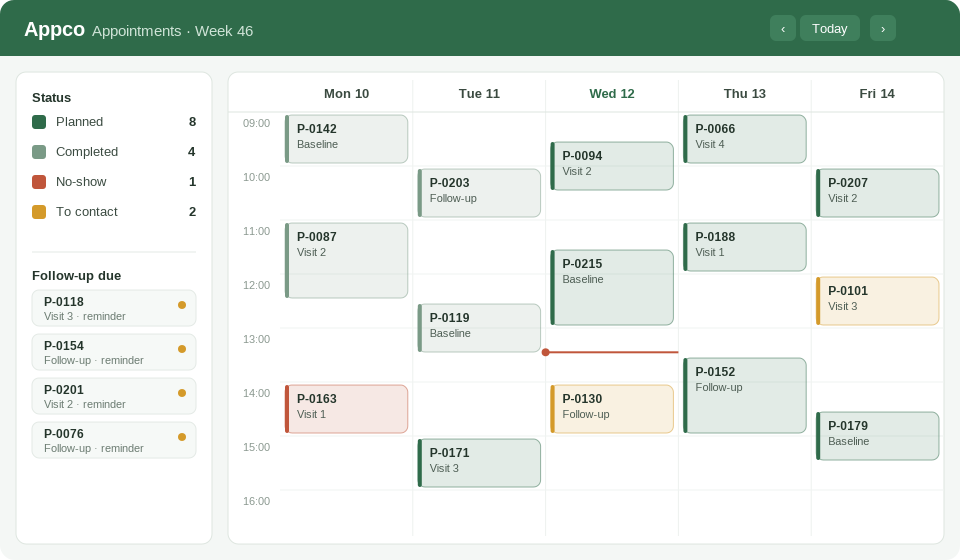
A central system that schedules participants' appointments, follows each participant through the study and keeps their personal details securely stored and up to date.

MS AccessVBA
  • Plans and tracks appointments for every participant
  • Follows each participant step by step through the study
  • Stores participants' personal details securely
  • Keeps participant data up to date
Survey management — Survey management through the LimeSurvey API
Survey management

Survey management through the LimeSurvey API

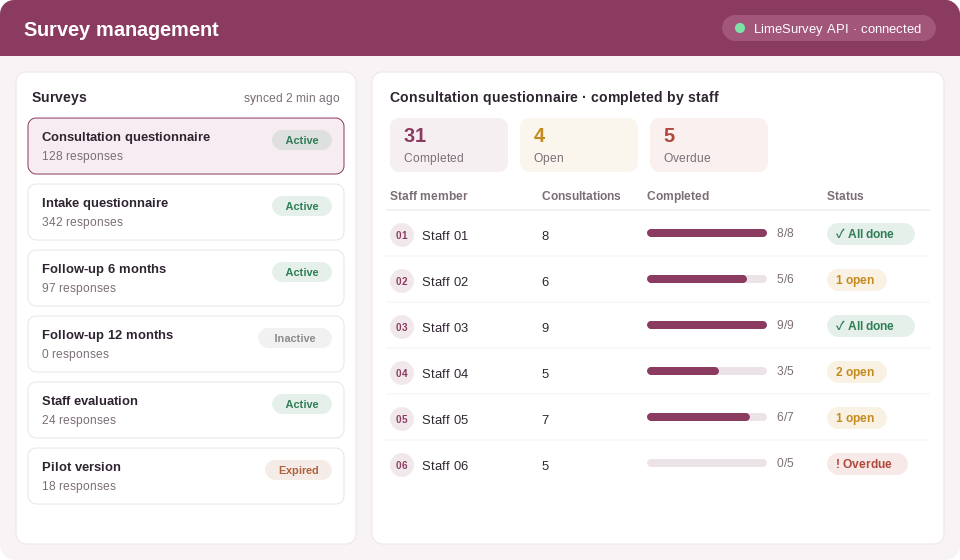
A direct connection to LimeSurvey through its API that brings survey management into one place — including a clear overview of whether staff have completed their consultation questionnaires.

LimeSurvey API
  • Connected directly to LimeSurvey through its API
  • Manages surveys from one place
  • Shows whether staff have completed their consultation questionnaires
AI integration — LimeSurvey Anthropic AI integration
AI integration

LimeSurvey Anthropic AI integration

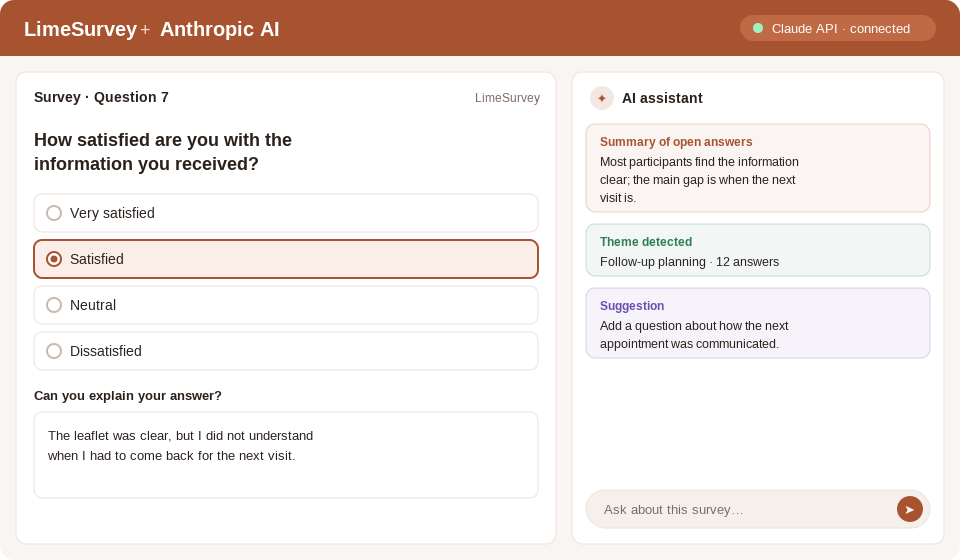
An integration that connects LimeSurvey to Anthropic's AI (Claude), bringing AI support directly into the survey process.

LimeSurveyAnthropic APIClaude
  • Connects LimeSurvey with Anthropic's Claude AI
  • Works through the Anthropic API
  • Brings AI support into the survey process
Survey tool — New survey themes
Survey tool

New survey themes

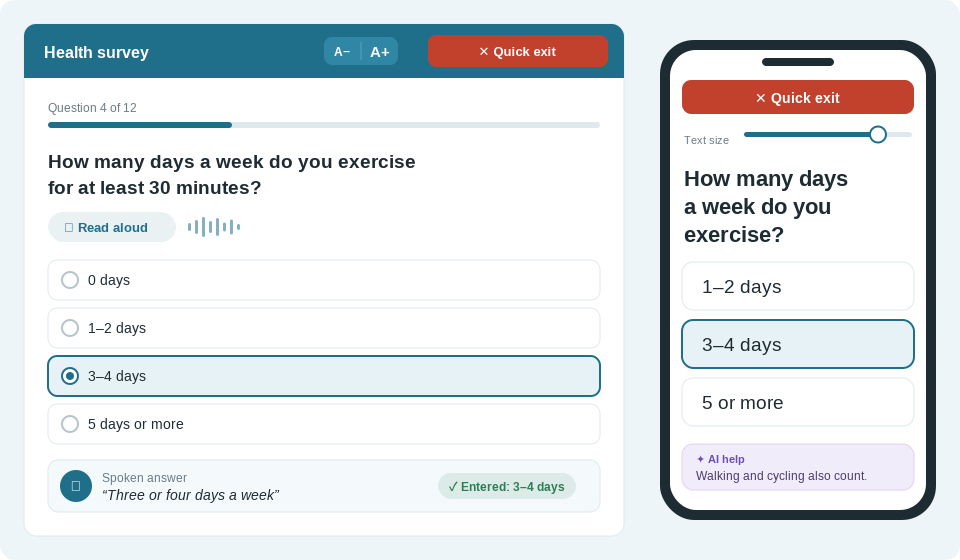
As technology advances, researchers' requirements grow and more is expected of data managers. With that comes a need for new survey methods. The new survey themes add these methods to surveys.

  • Reads the questions and answer options aloud to the participant
  • Spoken answers are entered into the survey
  • Each participant can enlarge or reduce the survey on any device
  • Quick exit: a participant can leave the survey instantly if someone should not see their answers
  • Surveys supported by AI
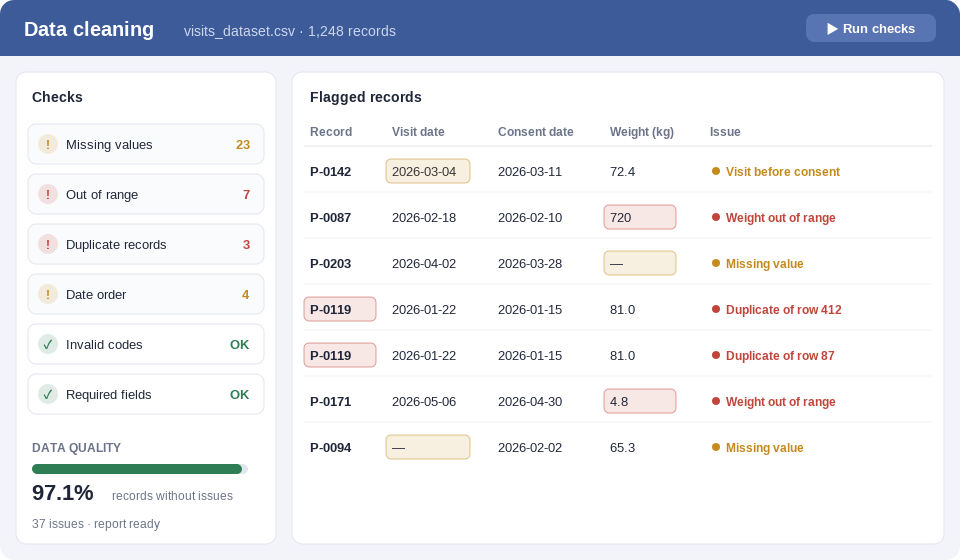
Data quality — Data cleaning
Data quality

Data cleaning

Raw research data is almost never ready for analysis. Data cleaning checks a dataset step by step for errors and inconsistencies and shows exactly what needs to be corrected — so that the analysis starts from a dataset that can be trusted.

  • Finds missing values
  • Flags values outside the allowed range
  • Detects duplicate records
  • Checks dates and the logical order between fields
  • Shows in a clear report what needs to be corrected
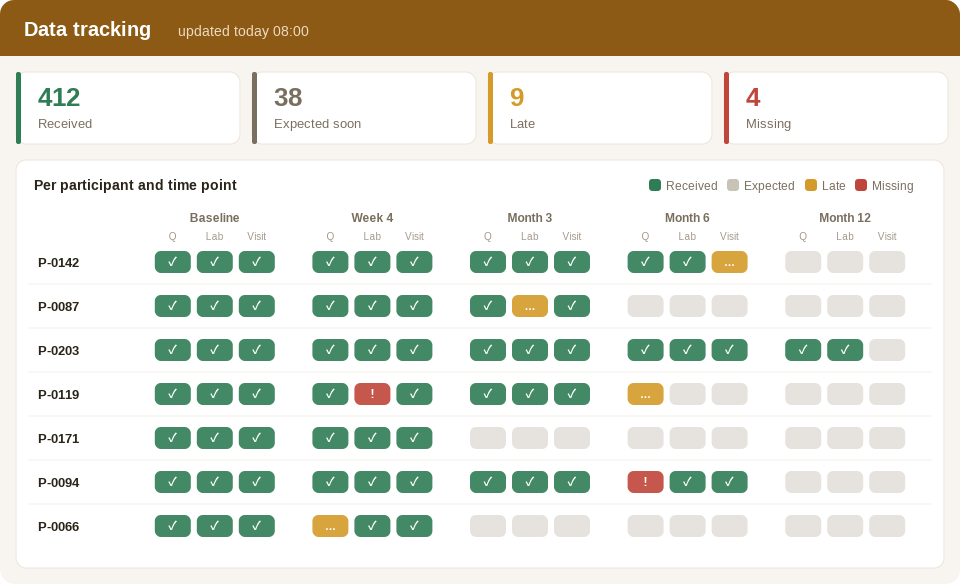
Data flow — Data tracking
Data flow

Data tracking

In a study, data arrives from different sources and at different moments. Data tracking monitors the incoming data and shows at a glance what has arrived and what is still missing — so gaps are noticed in time, not at the end of the study.

  • Monitors incoming data
  • Shows what has arrived and what is still missing
  • Status per participant and per time point at a glance
  • Makes late or missing data visible in time
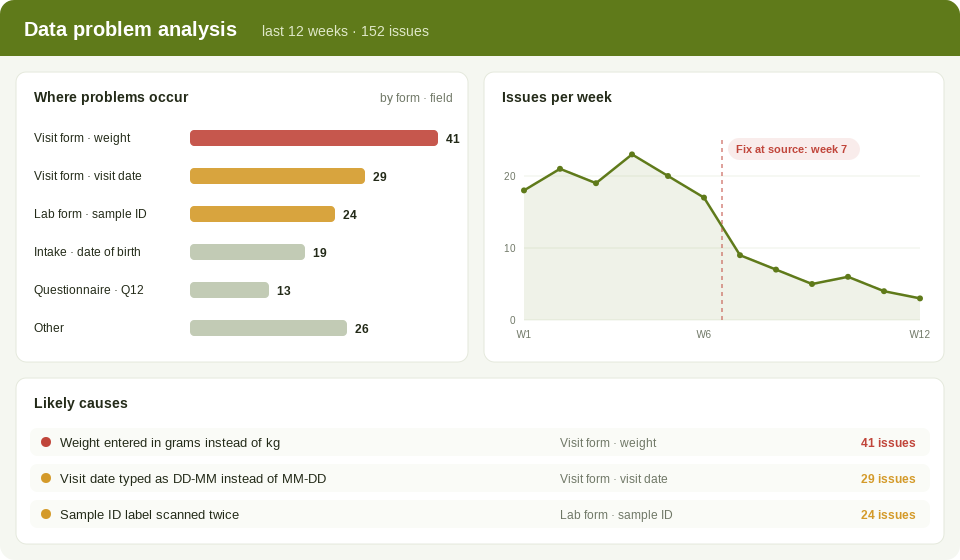
Root cause — Data problem analysis
Root cause

Data problem analysis

Data cleaning corrects an error; data problem analysis finds out why it happened. It groups problems by type, source and time and shows in which form, which field or which step most problems arise — so they can be solved at the source and do not keep coming back.

  • Groups problems by type
  • Shows in which form and field most problems occur
  • Follows how problems develop over time
  • Helps find the cause, so problems are solved at the source
Free tool

Codebook generator

A free, browser-only tool that turns an Excel or CSV variable list into a clean, printable codebook in seconds.

JavaScriptPrivacy by design
About this project →
  • Reads an Excel or CSV variable list
  • Value labels and missing-value codes laid out clearly
  • No account needed
  • Nothing is uploaded — the data never leaves the browser
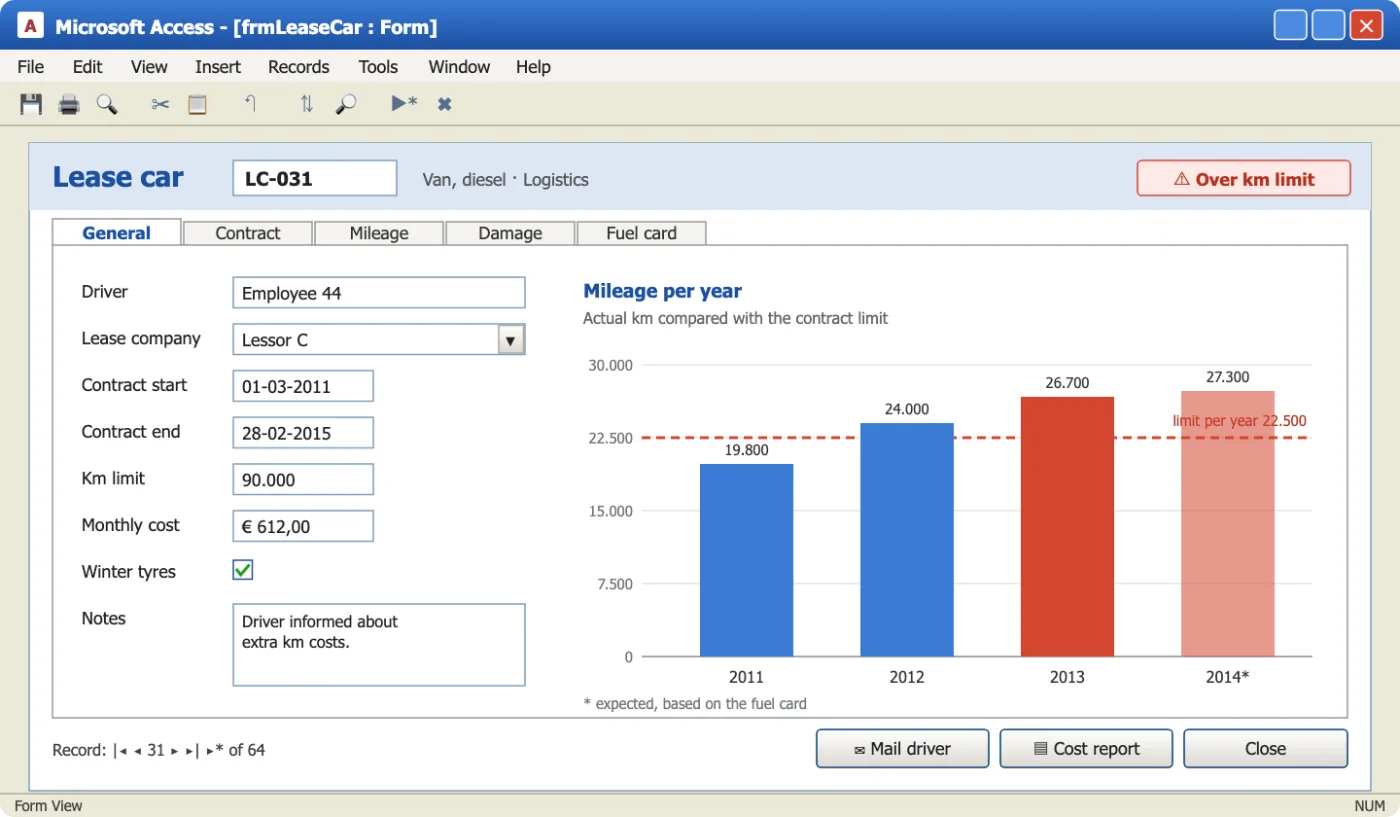
MS Access · VBA — Car lease register
MS Access · VBA

Car lease register

An MS Access (VBA) register of lease cars.

MS AccessVBA
MS Access · VBA — EDB – two-way orders between a bank and a collection agency
MS Access · VBA

EDB – two-way orders between a bank and a collection agency

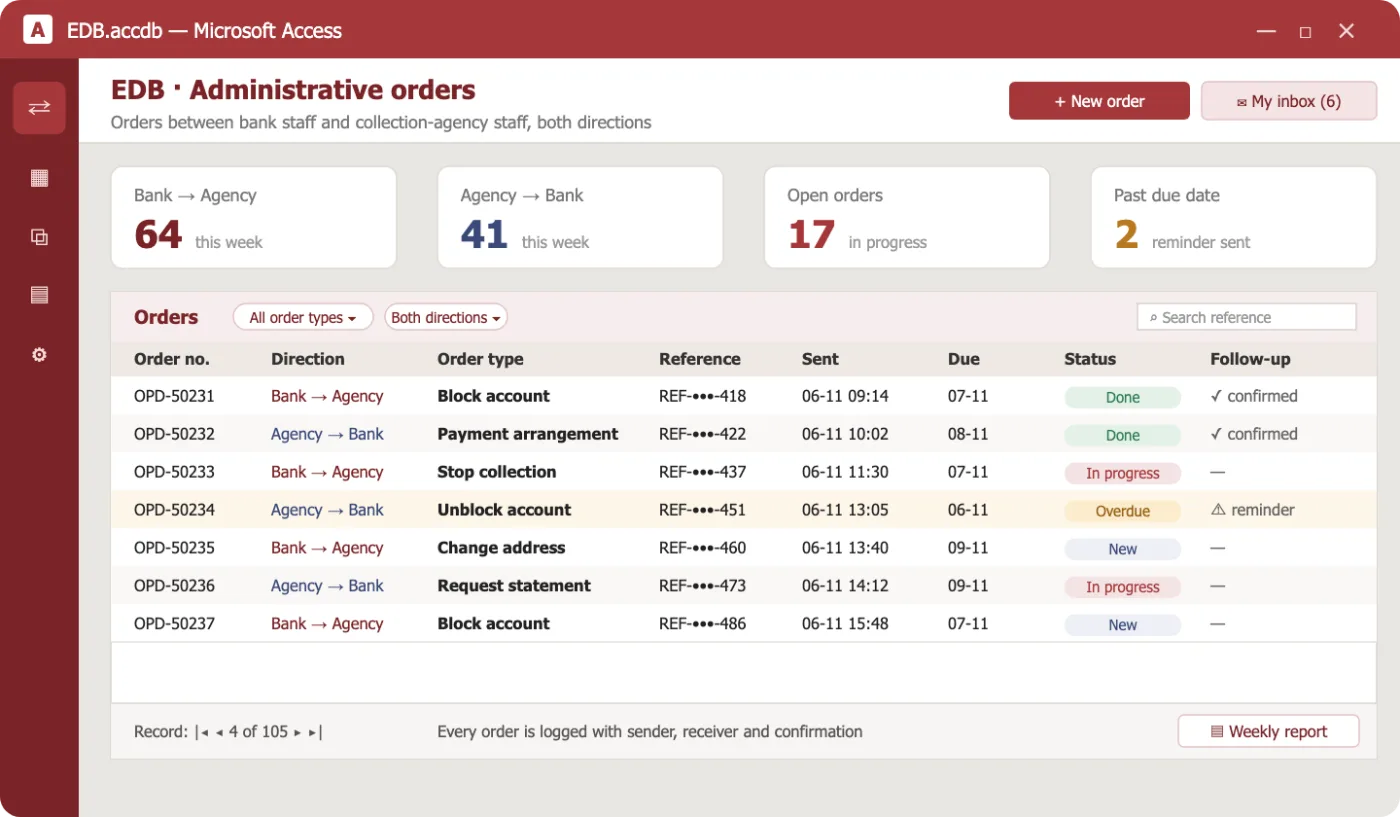
An MS Access (VBA) application (2005–2006) in which staff of two companies – a bank and a collection agency – send each other administrative orders, for example that an account must be blocked.

MS AccessVBA
  • Orders in both directions: bank → agency and agency → bank
  • Every order is recorded with sender, receiver and status
  • Shows which orders are still open
MS Access · VBA — FAQ system with tree view for a call centre
MS Access · VBA

FAQ system with tree view for a call centre

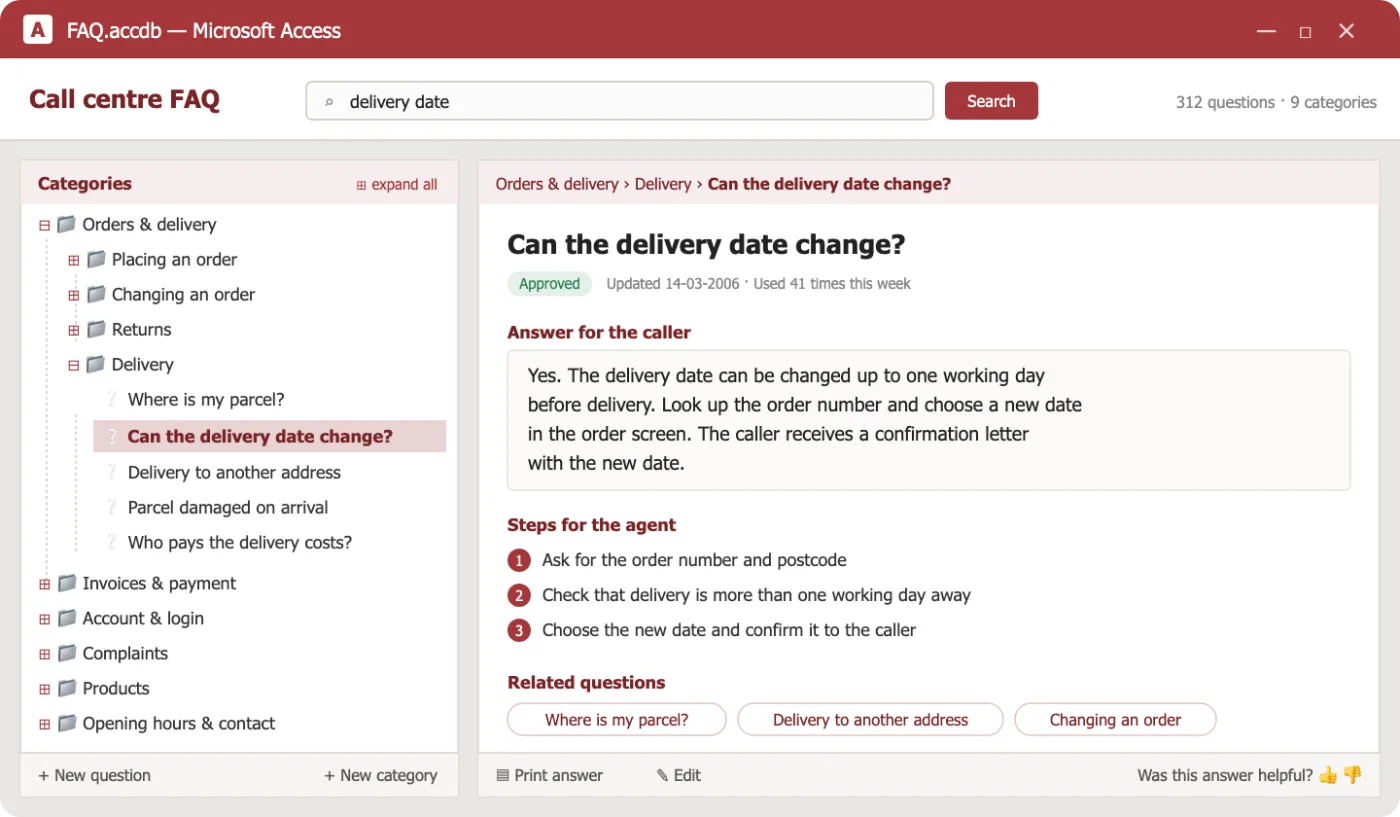
An MS Access (VBA) FAQ system for a call centre (2006–2007). Questions and answers are arranged in a tree view of categories, so the right answer can be found quickly during a call.

MS AccessVBA
  • Categories and questions in a tree view
  • The answer to the selected question shown next to the tree
MS Access · VBA — Municipal monuments register
MS Access · VBA

Municipal monuments register

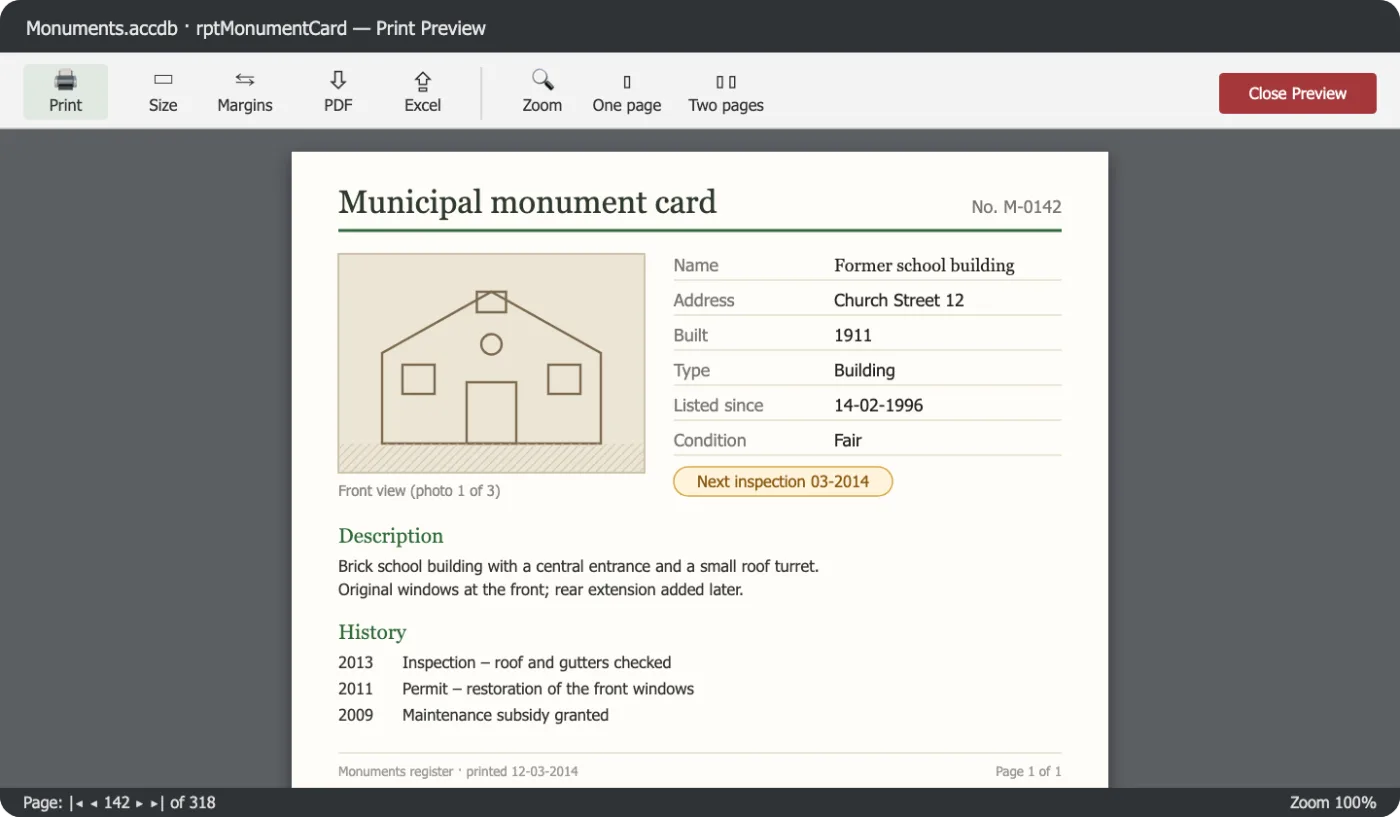
An MS Access (VBA) register of municipal monuments.

MS AccessVBA
MS Access · VBA — Purchasing register
MS Access · VBA

Purchasing register

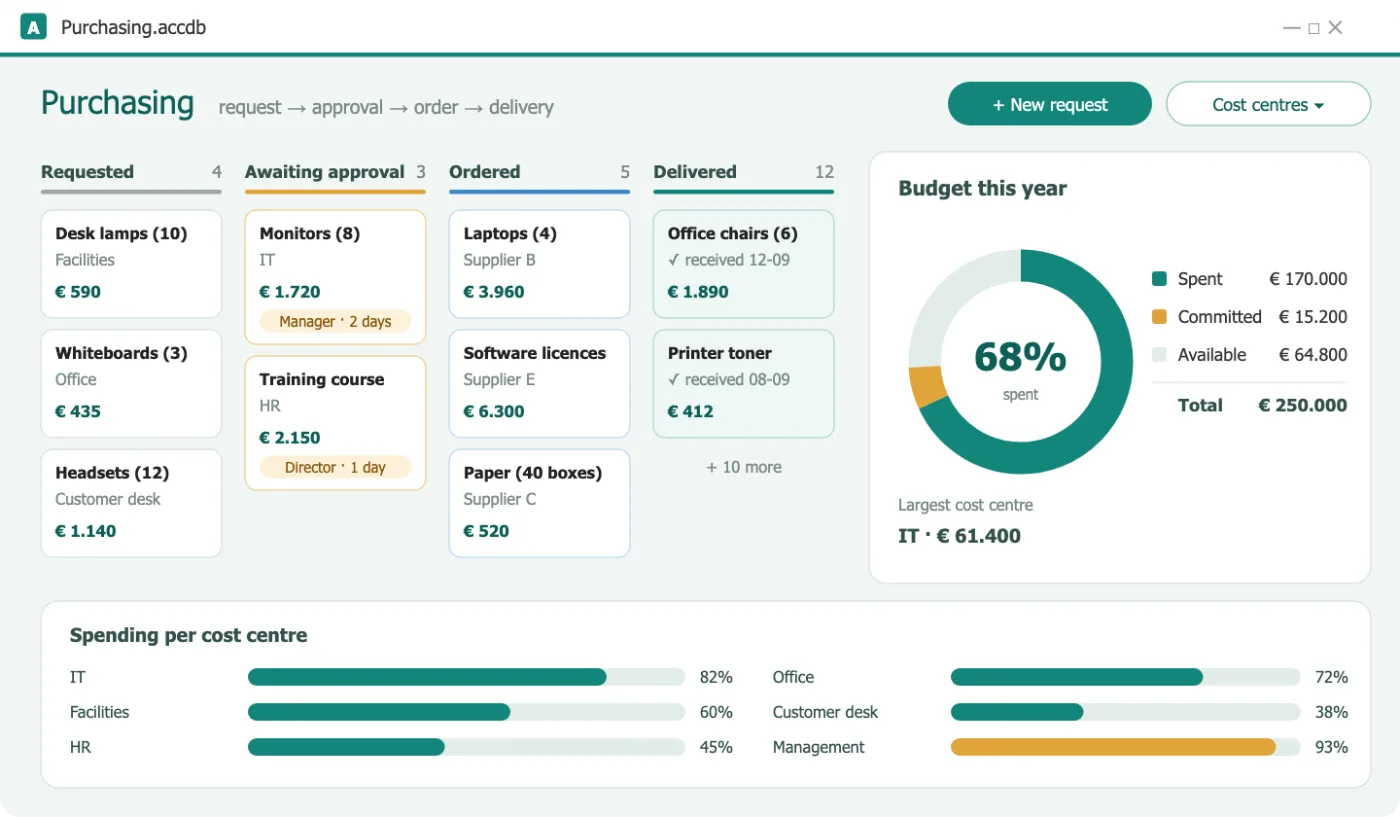
An MS Access (VBA) register of purchases.

MS AccessVBA
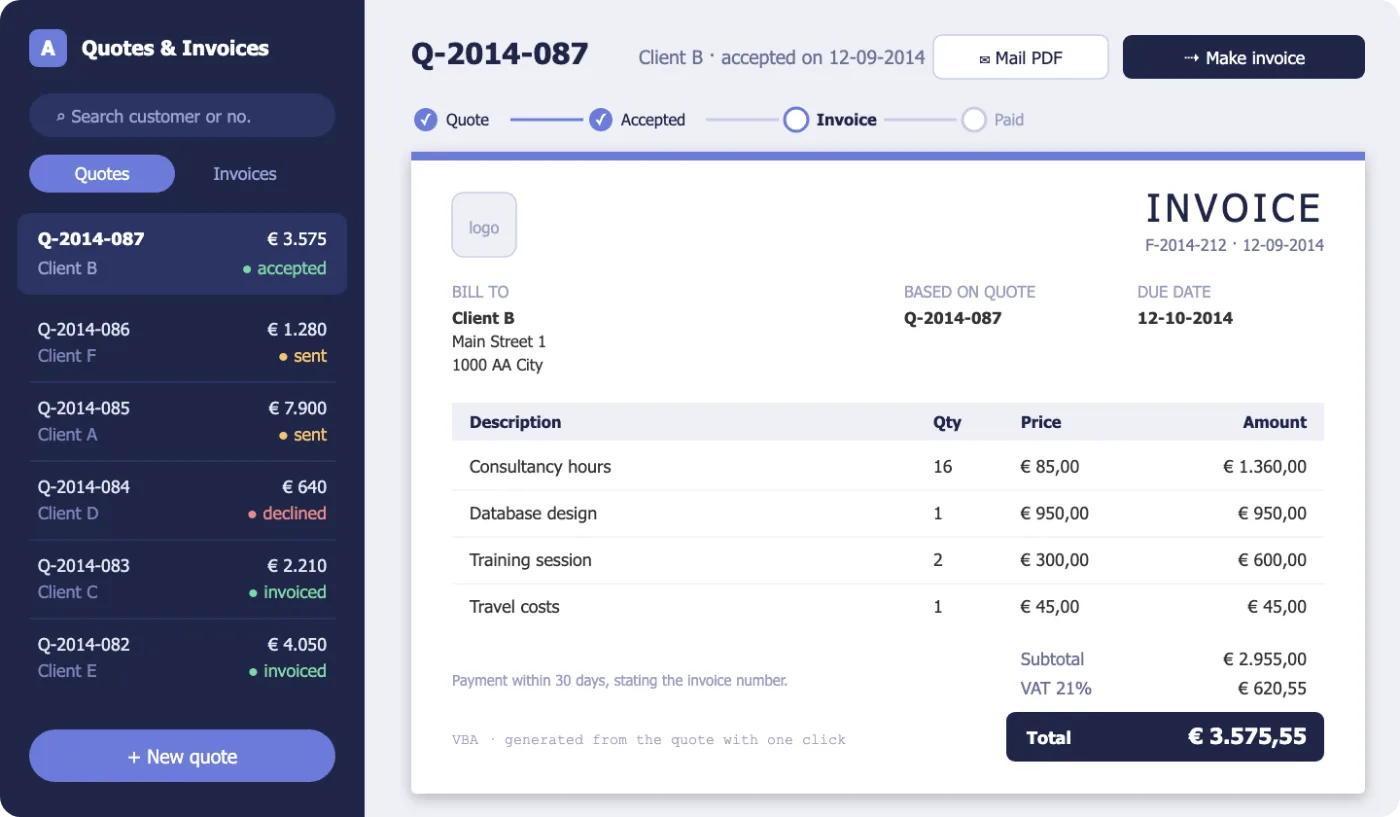
MS Access · VBA — Quote and invoice system
MS Access · VBA

Quote and invoice system

An MS Access (VBA) system for quotes and invoices.

MS AccessVBA
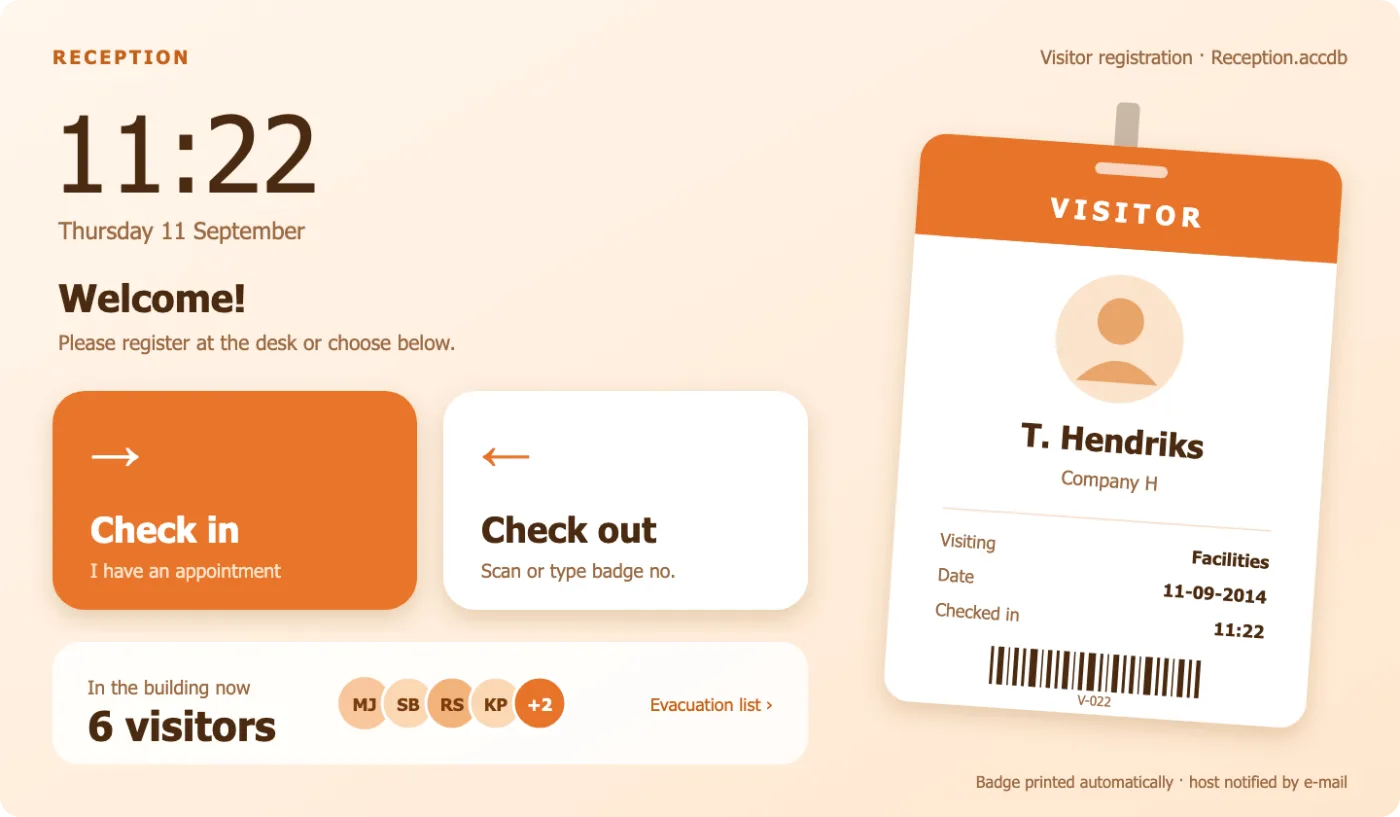
MS Access · VBA — Reception visitor registration
MS Access · VBA

Reception visitor registration

An MS Access (VBA) application for registering visitors at the reception.

MS AccessVBA

More software I designed and built

✍️

Informed consent management

Records and tracks participants' informed consent, so it is always clear who has agreed to what.

📝

Questionnaire builder

A tool for designing and building questionnaires.

📨

Partner notification

Built for an STI clinic: nurses use it to inform the partners of patients.

Seminars I attended

  • 22 Oct 2024
    National Open Science Festival · Maastricht University

    The national festival on open science in the Netherlands.

  • 12 Oct 2023
    Health-RI Conference – Connecting the Dots · Jaarbeurs, Utrecht

    National conference on health data and research infrastructure.

  • 10–12 May 2022
    SURF Research Week · Jaarbeurs, Utrecht

    On digital infrastructure and IT for research.

  • LCRDM meetings

    Meetings of the Dutch national network for research data management.

Posts

Social media posts

📖 STORIES OF A DATA MANAGER

Part 1 – One term, different meanings

While developing my Codebook (data dictionary program), I ran into something that made me think.

I was comparing and documenting variables from different studies. Many terms seemed familiar. The same names kept coming back. Yet the meaning turned out not always to be the same.

Read the full post

Take, for example, the term Participant.

When does someone actually count as a participant?

From screening? After giving informed consent? After randomisation? Or only once they have completed the study?

🔹 Screened
🔹 Enrolled
🔹 Randomized
🔹 Completed

These are different phases of a study. Which participants are counted in a report depends on the definition and the criteria set for that study.

The same applies to terms such as Baseline, Day 1 and Visit. The names seem self-evident, but the underlying definitions and how they are applied can differ.

And that is exactly where the problem lies.

Two reports can both show the number of Participants, yet count different groups. That is not necessarily wrong. It only becomes a problem when the differences are not clearly documented and the results are simply compared with each other.

That is why I think it is important that a Codebook contains more than just variable names and descriptions.

It should also make clear:

What a variable means exactly.

Which data source the information comes from.

How a value is determined or derived (derivation).

Which criteria apply to, for example, analysis populations such as ITT and Safety.

CDISC standards and controlled terminology can help here, but project-specific definitions remain necessary.

In the end, it is not only about which data we collect, but above all about what that data means.

Because if we use the same term, can we automatically assume that we also mean the same thing?

Do you recognise this from your daily work? Which term has ever made you hesitate?

#DataManagement #ClinicalResearch #DataDictionary #CDISC

📖 STORIES OF A DATA MANAGER

Part 2 – A number is correct. But where does it come from?

Imagine: you open a dataset and see this value for a participant:

Age = 35

Read the full post

Nothing special, right?

But how did this value actually come about?

Did the participant state their age themselves? Was it calculated from the date of birth? Was the value taken over from another system? Or did someone enter it by hand?

The result is the same: 35.

But the origin is completely different.

This made me think about another important aspect of data management: not only the value itself matters, but also where it comes from.

In research data, we can distinguish between:

🔹 Collected: data gathered directly.

🔹 Transferred: data taken over from another system.

🔹 Derived: data calculated from other variables.

🔹 Manually entered: data entered by hand.

Without this information, it is not always easy to find out how a value came about.

That is why it is important to record not only what a variable means, but also:

Where does the information come from?

How was the value obtained?

Has the value been adjusted or calculated?

Which rule or calculation was used?

A value can look perfectly fine at first sight. But without knowing its origin, we do not always know how to interpret it.

Data quality is not only about whether a value is correct, but also about whether we can trace where it comes from and how it came about.

How important is data traceability in your daily work?

#DataManagement #ClinicalResearch #DataQuality #DataTraceability

📖 STORIES OF A DATA MANAGER

Part 3 – An empty cell: document or correct?

An empty value in a dataset can have different causes. But how do we know whether this gap is logical or points to a data error?

Three examples:

Read the full post

🔹 New variable: A variable is added during an ongoing study. In existing records it stays empty, because the data was not yet being collected at the time.

🔹 Questionnaire logic: A participant answers No to an earlier question. As a result, a following question or group of questions is skipped. Here the empty fields are a consequence of the study design.

🔹 Data error: A participant answers Yes, but the related field stays empty. This may point to an error in data entry, data import or the questionnaire logic.

What can we do about it?

  • Codebook: Document when and under which conditions data is collected. This helps researchers interpret empty values better.
  • Consistency checks: Check whether the data follows the study logic and flag unexpected empty values.
  • Follow-up: Investigate deviations and correct them where possible. If correction is not possible, assess whether the record is suitable for analysis.

The Codebook helps explain why data is missing. Consistency checks help discover when data is missing when it should not be.

How do you handle this in your research projects?

#DataManagement #ClinicalResearch #DataQuality #DataConsistency #Codebook

📖 STORIES OF A DATA MANAGER

Part 4 – A questionnaire completed. And then the reward?

In many studies, participants receive a reward after completing a questionnaire.

But how is that reward actually handed out?

Read the full post

Often this requires extra manual work:

  • Keeping track of which participants have completed the questionnaire.
  • Checking who is entitled to a reward.
  • Assigning and sending reward codes.
  • Preventing the same reward from being issued more than once.

This takes time and increases the chance of errors.

Can't this process be simpler?

A practical solution is to link the reward directly to completing the questionnaire:

🔹 The participant completes the questionnaire.
🔹 The system automatically checks whether the participant is entitled to a reward.
🔹 One unique reward code is assigned.
🔹 The participant receives the code directly on screen.

This automates the process, without researchers having to check and issue every reward by hand.

Less administrative work for researchers and an immediate reward for participants.

How is the issuing of participant rewards arranged in your research?

#ClinicalResearch #SurveyResearch #ResearchTechnology #DataManagement #ParticipantExperience

📖 STORIES OF A DATA MANAGER

Part 5 – Integrating AI into software and data analyses: are general guidelines enough?

More and more organisations are integrating AI into their analyses, applications and daily work processes.

In doing so, they often look at general guidelines for safe and responsible AI use.

Read the full post

But there is another aspect that deserves attention:

General AI guidelines are not automatically enough to use AI responsibly within an organisation.

Besides general criteria, every organisation also needs its own conditions.

1. General criteria

These are principles that matter to almost every organisation:

  • Data security and privacy.
  • Reliability and accuracy of AI results.
  • Transparency and traceability.
  • Human oversight and responsibility.
  • Risk assessment and compliance with laws and regulations.

2. Organisation-specific criteria

In addition, every organisation has its own conditions, depending on its activities, systems and responsibilities.

For example:

  • Which AI models and external services are allowed?
  • Which data may be shared with an external AI service?
  • How are sensitive and confidential data protected?
  • Which access rights does an AI application get?
  • How is AI integrated with existing applications and databases?
  • Who reviews and approves a new AI application?

3. Technically possible does not automatically mean allowed

An AI solution can work technically very well, and still be unsuitable for use within a particular organisation.

This applies, for example, to an application that sends data to an external AI service while internal policy does not allow this.

That is why not only the AI application itself should be assessed, but also the way it is used within the organisation.

A successful AI integration does not start with choosing an AI model, but with defining the conditions under which an organisation wants to and can use AI responsibly.

How have you arranged the criteria for AI use within your organisation?

#ArtificialIntelligence #AIIntegration #DataManagement #DataGovernance #ClinicalResearch #DataSecurity