Research data dictionary software.
Every variable, finally documented.
VarBook is data dictionary software for research studies: one place to document a study's data files, tables, variables, value labels and questionnaire metadata. It turns scattered variable lists, half-updated codebooks and tribal knowledge into one browsable, bilingual (English and Dutch), always-current data dictionary — installed as your own independent instance, under your own name. Ask its built-in AI assistant to suggest a research topic or explain a table, grounded in your own data, not a generic guess.
Demo login — username demo, password ViewMetaco2026. Read-only — browse freely, nothing can be changed.
Every feature, explained in two minutes
Plays from YouTube (privacy-enhanced mode), only after you click. Watch on YouTube
Why research data documentation falls apart
Not because anyone was careless — because a study's data dictionary usually has no proper home. It lives in whichever tool happened to be open when someone last updated it.
The codebook lags the database
A field gets renamed, retired, or added — and the spreadsheet everyone still emails around doesn't hear about it for months.
No single source of truth
One researcher's private notes say one thing, the Access database's field comment says another, and nobody's sure which is current.
Sensitive fields aren't flagged
HIV status, substance use, partner details — buried in a table like any other column, with no visible warning to whoever's browsing.
A data dictionary viewer for researchers, an editor for data managers
Researchers browse. Data managers maintain. Nobody rebuilds or redistributes a file — an edit is visible everywhere the moment it's saved.
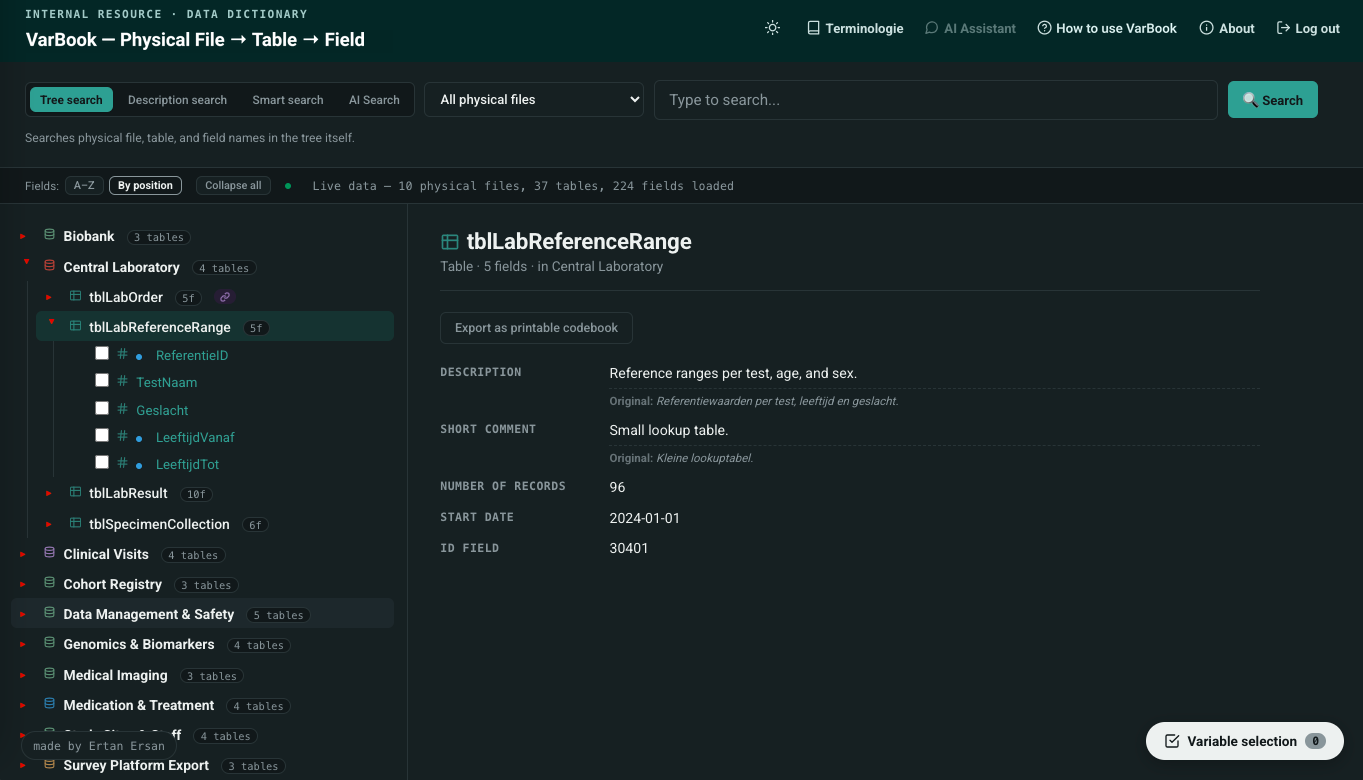
Browse the whole dictionary, instantly
The Viewer
- ✓ Browse the full Physical File → Table → Field tree, or jump straight to a field
- ✓ Search by name, by description, or by meaning — "which fields are about medication?" finds the right ones even without the exact word
- ✓ Every field in the local language and English side by side
- ✓ See which questionnaire a variable was asked in, and the skip logic that decided who saw it
- ✓ Sensitive fields carry a visible warning, not a silent risk
- ✓ Value ranges, quality labels, retirement dates, and cross-references, all in one place
- ✓ New: an AI research assistant that suggests topics and explains tables in plain language — restricted to data managers, off by default
- ✓ New: export to DDI-Codebook 2.5 XML, the international metadata standard used by data archives — alongside Stata .do, CSV and a printable codebook
The Editor
- ✓ Add or update physical files, tables, fields, and value ranges directly — no CSV round-trip
- ✓ New: bring an existing spreadsheet with you — import physical files, tables, fields, and value ranges straight from CSV
- ✓ New: "Suggest with AI" grows your synonym and terminology dictionary for you, one reviewed batch at a time
- ✓ Nothing saves until you click Save and confirm it — no accidental edits, ever
- ✓ Deleting something that's still in use is blocked, not silently allowed
- ✓ Changes reach the Viewer instantly — no export, no rebuild, no re-upload
- ✓ Everyone gets their own login with a role — admin, data manager, or read-only researcher
Variable metadata a codebook usually loses
Search by meaning
Ask in plain language and find fields whose names never contained the word you typed.
Bilingual by design
Local-language and English descriptions live side by side, not in two disconnected files.
Sensitivity flags
Keywords you define get flagged wherever they appear, automatically, across the whole dictionary.
Value ranges & codes
Coded answers resolve to their real labels, with each range reusable across every field that needs it.
Terminology tracking
See how often a chosen concept actually appears across descriptions, tables, and surveys — live, not a stale report.
Live, not rebuilt
One shared database behind both views — an edit is visible to every researcher the moment it's confirmed.
AI research assistant
A real conversation about your dictionary — suggest a research topic, explain a table, compare concepts. Optional, self-hosted, restricted to data managers.
Bring your own data
Already have a spreadsheet of tables and fields? Import it straight in — no starting from a blank screen.
DDI standard export
Pick the variables you need and export them as DDI-Codebook 2.5 XML — both languages, value labels and skip logic included — ready for a data archive or a FAIR data plan. About DDI-Codebook.
RemoteControl API
Read the dictionary from R, Python or Excel through a JSON-RPC API, like LimeSurvey's RemoteControl — read-only, with each user's own account and rights. API reference and live demo endpoint.
Your data dictionary. Your server. Your name on it.
VarBook isn't a shared platform your data sits inside — it's a fully independent installation, licensed to your organization alone, running on infrastructure you control.
- A completely separate install per organization — nothing shared, nothing shared-hosted
- Your own logo, name, and page title throughout the Viewer and Editor
- Starts empty — build your own dictionary from the first field up
- A straightforward annual license, renewed on your terms
Server requirements
Ordinary shared web hosting is usually enough. Not sure about your server? Ask us, or choose Guided Setup.
A data dictionary for research studies, not a data warehouse catalog
Tools like Collibra or Alation are built for company-wide data governance across dozens of systems. A single study's codebook doesn't need that — and usually can't get IT's time or budget for it anyway.
VarBook in short
What is VarBook?
VarBook is data dictionary software for research studies and cohorts. Data managers use it to document data files, tables, variables, value labels, missing codes and questionnaire metadata in one place; researchers browse and search that documentation in English and Dutch. Each organization gets its own independent installation.
Does VarBook store participant data?
No. VarBook stores metadata only: descriptions of variables, codes and questionnaires. The study data itself stays in your own data collection and analysis systems.
Does VarBook replace REDCap or LimeSurvey?
No. Data collection stays in REDCap, LimeSurvey or wherever you run it now. VarBook documents the variables: it can import a REDCap data dictionary, and it shows in which LimeSurvey questionnaire a variable was asked and under which skip logic.
Which export formats does VarBook support?
DDI-Codebook 2.5 XML (the metadata standard used by data archives), Frictionless Data Package, Stata .do, CSV and a printable codebook. A read-only API lets you read the dictionary from R, Python or Excel.
Research data documentation, step by step
Practical guides for documenting study variables, codebooks and questionnaire metadata — useful whether or not you use VarBook.
Working with a REDCap data dictionary
Keep REDCap for data capture and give your team a searchable, bilingual reference for its variables.
Bilingual (EN/NL) data dictionaries
One record per variable in two languages, instead of two spreadsheets drifting apart.
Codebook vs. data dictionary
Where the two terms overlap, where they differ, and what data archives expect.
How to structure a codebook
The columns you need, value labels, missing codes and checks before you share it.
Codeboek maken (Nederlands)
Stap voor stap een codeboek maken vanuit Excel of SPSS.
DDI-Codebook XML export
What a DDI codebook contains, when archives need it, and how to export it.
LimeSurvey codebook generator
Turn a LimeSurvey .lss file into a printable codebook with value labels and conditions — free, in your browser.
Free codebook generator
Turn an Excel or CSV variable list into a printable codebook — runs in your browser.
Interested? Let's talk.
Want to know what VarBook would cost for your study? Get in touch and we'll tell you what fits — no obligation.
Made in Amsterdam by ersan.eu
VarBook is built and supported by ersan.eu, an independent software maker in Amsterdam, the Netherlands. ersan.eu also makes REWARDR, automatic reward delivery for survey participants.
Ready to give your study a real research data dictionary?
Tell us a bit about your study and we'll set up your own independent VarBook instance — empty, branded, and ready for your first table.